

1. Open VScode
You will need VScode to make edits to python scripts, so install that on your windows machine.

2. Open up the terminals
In VScode, open up the terminal along the top, you should see boxes appear along the bottom

3. Install Python
if you haven’t done this yet you need it for python virtual environments.
https://www.python.org/downloads

make sure you select pip in the install wizard.
pip stands for “pip Install Packages”, not very creative.
pip is a tool/software that allows python and your computer to download and access the “Python Package Index”!!!
You can think of it as a library of tools, you can check in and out. Mostly checking out software packages by installing them to your machine and using them with python.
4. Install virtual env globally
in your terminal type in pip install virtualenv.
if you get pip not found follow this guide.
pip install virtualenv5. Creating Virtual Environments
python -m venv exampleWhy? create virtual environments? and why is the first thing I teach students?
Well imagine every time you check out a book of library it could be a different Edition of that book.
In software we have different versions of software they get updated over time by other coders. For example we had
- Windows 7
- Windows 8
- Windows 9x series (back in the 90s) its just bad branding
- Windows 10
- Windows 11
Every release comes with bug fixes, new features, and security updates.
It also a way for software companies to make money through licenses.
Now imagine these books you check out can magically work together or even built onto one another into new books. This is called interdependence!!! or commonly known as software dependency.
Now the reason to have a virtual environment is to ensure that software packages you install are compatible.
See if one of the books are broken or out of date with the latest version of windows OS, python version 3.11 or another package it breaks your code.
Virtual environments are just a way to install and uninstall software packages confined to their “environment” instead effecting the entire operating system environment.

6. Entering the virtual environment
first I would always list out the folders in the terminal by typing ls and hit enter.

this will make sure you are in the right directory level to access and run the virtual environment.
to enter the virtual environment
.\example\Scripts\activatethis is running the activate.bat script contain under the virtual environment folder
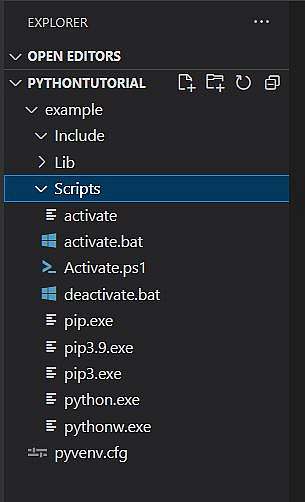
7. Look at the terminal
You should see name of your virtual environment in parentheses. (example) or (venv) is a common name.
This indicates you are in the virtual environment.

8. Install packages or Uninstall package
now you have ability to contain your installing software and reduce package conflict inside your virtual environment.

you can save your specific environment with
pip freeze > requirements.txtthis how you share your install list with ither software engineers to run and test your code.
9. Finally how to exit the virtual environment
Simply type into the terminal “deactivate” and the parentheses should disappear stating you are out of python virtual environment.
deactivate
If you are interested in more tutorials, please subscribe below to our newsletter.
You will get articles on code, design, and investing.